

iBOS® Hardware

Your central resource for specifications, setup guidance, and support materials.
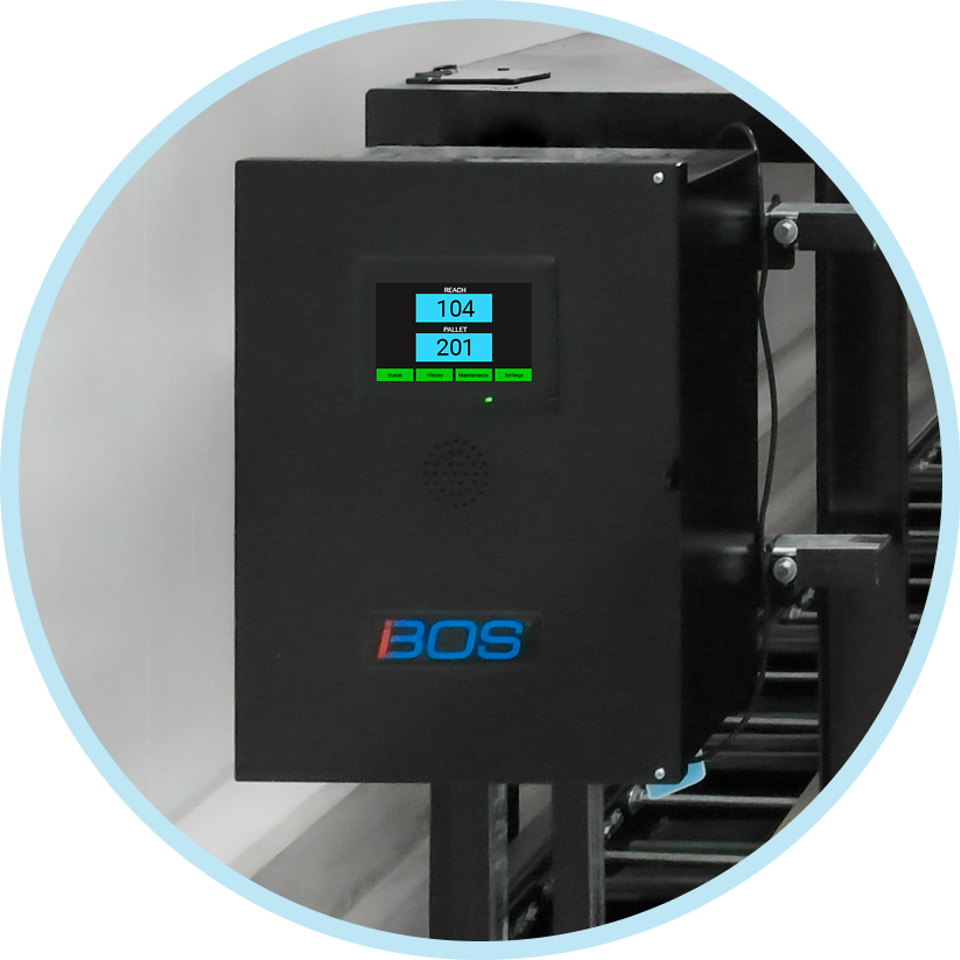
Meet the iBOS Components:

iBOS Core Intelligence

iBOS Operations Dashboard

iBOS Data Services

Engineered for Complex Operations, Configured for Your Site

iBOS hardware is purpose-built to support complex battery room operations with dependable performance and flexible configurations. Not sure where to start? Our team will make a custom set up for your exact needs.

Get In Touch

Specifications and Technical Resources

This page serves as a technical reference hub where you can find detailed product overviews, specifications, and supporting resources to help with installation, configuration, troubleshooting, and ongoing operations.

New to iBOS? Check out the main page to learn how these products work together to make your site run better than ever.

iBOS® Pro Controller

  • Manages up to 350 chargers based on the model is selected.
  • Manages up to 9 battery pools. A pool is a group of the same battery/truck type.
  • Easy to use “read and react” system. Built-in color touch screen and bright blue pick lights on each charger tell operators the correct battery to pick next.
  • Built-in shouter alarm alerts the operator, with a loud alarm when the wrong battery has been selected.
  • Summary statistics on good and bad battery selections and a graph of battery availability for the past seven days can be viewed on the touch screen.
  • Built-in UPS to protect against power outages and power surges.

BOS-CB6700

  • Chargers: 200 (max)
  • Scrolling display ports: 3

BOS-CB6710

  • Chargers: 350 (max)
  • Scrolling display ports: None


Dimensions: 23"H x 20"W x 8.5" D (58.42 cm H x 50.8 cm W x 21.59 cm D)

Weight:  39.75 lbs. (18.2Kg)

Input Voltage: 100-240 VAC 50/60 Hz

Power Usage: 1.3 Amp (max)

Power cord length: 1 Ft (30.5 cm) (to UPS)

Operating Conditions - Controller: -40° to +85°C

Operating Conditions - Sentinel: -0° to +55°C


System Diagram with Peripherals
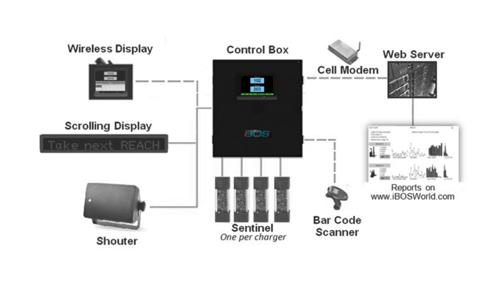
iBOS Pro Control Box-2

iBOS® Plus Controller

  • Manages up to 100 chargers and up to 9 battery pools. A pool is a group of the same battery/truck type.
  • Easy to use “read and react” system.
  • Built-in color touch screen and bright blue pick lights on each charger tell operators the correct battery to pick next.
  • Built-in shouter alarm alerts the operator, with a loud alarm, when the wrong battery has been selected.
  • Summary statistics on good and bad battery selections and a graph of battery availability for the past seven days can be viewed on the touch screen.


Dimensions: 14.5"H x 14"W x 5" D (36.83 cm H x 35.56 cm W x 12.7 cm D)

Weight:  13.6 lbs. (6.17 Kg.)

Input Voltage: 100-240 VAC 50/60 Hz

Power Usage: 1.3 Amp (max)

Power cord length: 6 Ft (1.82 m)

Chargers: 100

Operating Conditions - Controller: -40° to +85°C

Operating Conditions - Sentinel: -0° to +55°C

System Diagram with Peripherals
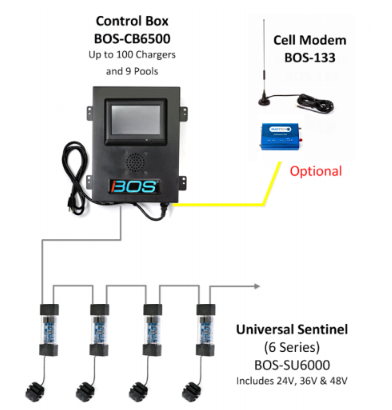
iBOS Plus Anatomy.png


iBOS® Basic

  • Manages up to 50 sentinels for one pool (groups of the same battery/truck type). One controller per pool is needed.
  • Works with iBOS Sentinel to utilize the bright blue pick lights on each charger tell operators the correct battery to pick next.
  • An audible alert sounds when a mispicks occurs.
  • The built-in alert system can also be used to diagnose any potential equipment faults.
  • Simple installation: no charger labels, no certified installation required, and no system configuration needed.
  • Ambient Temperature:  32 to 104°F (0 to 40°C)
  • Storage Temperature:  32 to 158°F (-10 to 70°C) 
  • Ambient Humidity: 20 to 80% RH (non-condensing)
  • Storage Humidity: 10 to 90% RH (non-condensing)
  • Rated Voltage: 100 to 240VAC
  • Operating Frequency: 47Hz to 63Hz
  • Operating Voltage Range: 90 to 264VAC
  • Operating Conditions - Controller: -40° to +85°C

  • Operating Conditions - Sentinel: -0° to +55°C

iBOS® Sentinel

  • One Sentinel required for each charger.
  • Universal voltage - Works on all high frequency, SCR and ferro resonant chargers in a conventional battery change application.
    • Sentinels work from 12 to 80 Volts DC
  • Includes data cable to interconnect sentinels in a daisy chain style connection.
  • Quick Tap connector provides easy method to connect to charger's DC cable. 
  • Highly visible pick light indicates the correct battery to select. 
  • Green and Amber diagnostic LEDs shows connection and power status. 


Power Source: Controller

Dimensions: 5.5"H x 1.75"W x 1" D (13.97 cm H x 4.45 cm W x 2.54 cm D)

Weight:  0.3 lb (0.14 kg)

Input Voltage: 24 VDC

Data Cable Length: 7 Ft (2.13 m) (included not shown)

Quick Tap Cable Length: 24" (61cm)

DC Battery Input: 12-80v


iBOS® Expansion Controller Pro

  • Access battery room data including location tracking and maintenance needs from the floor, no log-in required.
  • Digital placard continuously displays instructions and tips on how to use the Touch Computers while the work center facilitates data communication to iBOSWorld.
  • The Expansion Controller Pro is housed in a cabinet that safely stores the display, with convenient access to the barcode printer and other iBOS spare parts.
  • Includes a monitor, keyboard, UPS and surge protector, wireless access point, barcode labels (refills available on our Parts Store), barcode printer, barcode holders (refills available on our Parts Store), and all necessary cables.


Compatibility:

  • iBOS Pro: Model BOS-CB6700 (v6.60G)
  • iBOS Pro: Model BOS-CB6710 (v6.60G)

Includes:

  • Label Printer
  • Extra Rolls of Labels
  • 24” Touchscreen Monitor
  • Keyboard and Trackpad
  • Backup UPS with Surge Protector
  • Wireless Access Point for Expansion Controller Accessories
  • Wheeled Cabinet housing all components

Dimensions: 63 x 24.5 x 22.5 in

Weight: 154 lbs

Input Voltage: 120 VAC 60 Hz

Input Current: 3 A max


iBOS® Expansion Controller Basic

  • Access battery room data including location tracking and maintenance needs from the floor, no log-in required.
  • Digital placard continuously displays instructions and tips on how to use the Touch Computers while the work center facilitates data communication to iBOSWorld.
  • Includes wireless access point, barcode labels (refills available on our Parts Store), barcode printer, barcode holders (refills available on our Parts Store), and all necessary cables.


Compatibility:

  • iBOS Pro: Model BOS-CB6700 (v6.60G)
  • iBOS Pro: Model BOS-CB6710 (v6.60G)

Includes:

  • Label Printer with 3-foot USB cable
  • Wall Mounting Holes for Controller
  • Wireless Access Point for Expansion Controller Accessories
  • 7-inch touchscreen

Dimensions:

  • Controller: 14.5 x 11 x 5 in (14.5 x 14 x 5 in with mounting holes)
  • Printer: 7.4 x 5.5 x 8.4 in

Weight:

  • Controller: 12.3 lbs
  • Printer: 2.4 lbs

Input Voltage:

  • Controller: 88-264 VAC
  • Printer: 120-240 VAC

Input Current:

  • Controller: 2.5 A/115 VAC, 1.5 A/230 VAC
  • Printer: 1.5 A max


iBOS® Wireless Display

  • Bright touch screen display wirelessly communicates with the Pro, Plus, and Basic Controllers to tell the operator which fully charged battery to select.  
  • Operator has access to the system's controller information without having to leave the battery extractor. Information varies based on Selector Controller series.


Dimensions: 7.5"H 10"W x 3.5" D (19.05 cm H x 25.4 cm W x 8.89 cm D)

Weight:  5.65 lbs. (2.56 kg)

Input Voltage: 100-240 VAC 50/60 Hz

Power Usage: 0.9 Amp (max)

Power cord length: 6 Ft to UPS (1.83 m to UPS)

Notes:

  • Includes: Mounting bracket


iBOS® Operations Dashboard

  • Two screens display battery room reporting, prioritized maintenance recommendations, and more performance-related information
  • A large flatscreen monitor displays KPIs for operator and manager reference while color touch screen allows for drilldown, no login required.
  • Automatically connects to your iBOS system upon powering on.
  • Includes color touch screen, 65” flatscreen TV, and mounting brackets for each.


Controller

Compatibility:

  • Expansion Controller Basic
  • Expansion Controller Pro

Controller Screen Size: 7 inch

Ports: HDMI, USB

Input Voltage: 85-264 VAC

Input Current: 0.7 A/115 VAC, 0.42 A/230 VAC

Optimized for a 65-inch TV hung in a portrait orientation with HDMI-CEC enabled

65-inch TV

Dimensions without Mount: 57.3 x 33.1 x 2.7 inch

TV Weight: 36.4 pounds

Mount Weight: 6.78 pounds

Input Voltage: 120 V 60 Hz AC

Power Consumption: 150 W

Included Mount is adjustable


iBOS® Touch Computer - Zebra TC-52

  • Plug and play design allows Touch Computers to automatically connect upon powering on; no setup required.
  • Training videos available 24/7 directly on device.
  • Wirelessly connects to the Expansion Controller, feeding site data into iBOSWorld. Must be used with an Expansion Controller Pro or Basic
  • Contents vary based on site needs and configuration but may include an extractor-mounted charging cradle, desktop charging cradle, clip-on charging cradle, and protective case with hand strap.

Compatibility:

  • Expansion Controller Basic
  • Expansion Controller Pro

Range:

  • Small Barcode – 2 feet
  • Large Barcode – 3 feet

OS – Android 11

Charging – Proprietary 7-pin Zebra Connector

Screen Size – 5 inch

Dimensions – 6.1 x 2.9 x 0.73 inch

Weight – 8.8 oz

iBOS® Touch Computer - Datalogic Memor 30x

  • Plug and play design allows Touch Computers to automatically connect upon powering on; no setup required.
  • Training videos available 24/7 directly on device.
  • Wirelessly connects to the Expansion Controller, feeding site data into iBOSWorld. Must be used with an Expansion Controller Pro or Basic
  • Contents vary based on site needs and configuration but may include an extractor-mounted charging cradle, desktop charging cradle, clip-on charging cradle, and protective case with hand strap.

iBOS® Charger Splitter

  • The Charger-Splitter allows users to configure one charger to serve two charging slots. It works by turning on a blinking white light to tell users of the system to unplug a charger from one battery and into the other. Check out our article on how Charger-Splitters work to learn more.
  • Charger-Splitters must be used with an iBOS system.
  • Alerts are displayed on the Operations Display 2.0 to ensure the switch gets done while reports on the iBOSWorld website track performance.
  • Includes Charger-Splitter Kit with two Sentinels, battery extension cable, and framing channel.


Part Numbers

  • BOS-258 - Charger-Splitter Kit. Includes:
    • 1 charger splitter bracket
    • 2 splitter enabled sentinels
    • 1 CAT-3 cable (7ft)
    • 1 CAT-3 cable (1ft)
  • BOS-137 - Charger-Splitter Bracket
  • BOS-SU6002 - Sentinel, Charger-Splitter enabled
  • BOS-259 - Sentinel white light upgrade module


iBOS® Operations Display 2.0

  • Computer with touch screen provides real-time view of the status of your battery room.
  • Pre-loaded with Operations Display software.
  • Can be used on desktop with the built in easel support bracket (included) or wall mounted with a bracket (included).  
  • Includes 100 ft (30.4 m) of data cable for connection to System Controller.
  • Multiple Languages supported:
    • EN English
    • ES Spanish
    • FR French
    • DE German
    • PT Portuguese


Part Number: BOS-253

Includes

  • 21.5 in (54.6 cm)  Touch Screen
  • 100 ft (30.4 m)  CAT 5E Ethernet cable.
  •  9 ft (2.7 m) power cord
  •  Desktop with easel stand
  •  Wall mount with bracket

AC Input

  • 100-240 VAC, 1.3 Amps, 50/60 Hz

Connectivity

  •  Wired: 100 ft (30.4 m) maximum distance when using CAT5 Ethernet cable (included).
  •  Wireless: 1000 ft (304 m) maximum distance when using our optional Wireless Modem Kit (Part Number BOS-WM1). 

Compatibility

  •  iBOS Plus: Model BOS-CB6500
  •  iBOS Pro: Model BOS-CB6700
  •  iBOS Pro: Model BOS-CB6710
  •  Not compatible with Series 4 and 5 models

Notes

  • Minimum System Controller software version required is v6.51.  The iBOS System can be upgraded to the latest version by ordering a new CF Card (BOS-189).
  • **The minimum iDisplay version is v38 to support Multiple Language on Operations Display.  The iDisplay can be upgraded by ordering a new SD Card (BOS-188).
  • Multiple Operations Displays can be connected to a single System Controller.  The maximum number depends on the open number of USB ports available on the System Controller. 
  • We recommend that an uninterruptable power supply (UPS), battery backup unit is used with the Operations Display.


iBOS® Remote Shouter

  • The shouter alarm alerts the operator when the wrong battery has been selected, enabling the system to ensure proper battery rotation.
  • The Remote Shouter can be added to augment the built-in Shouter on the system Controller often for larger battery rooms to make sure that that the mispick alarm is heard.
  • An additional Shouter can be remotely mounted away from the Controller for larger battery rooms.
  • Available on our Parts Store


Power Source: Control Box

Dimensions: 7"H x 5"W x 7" D (17.78 cm H x 12.7 cm W x 17.78 cm D)

Weight:  4.8 lbs. (2.18 kg)

Power cord length: 50 Ft (15.24 m)


iBOS® Scrolling Display

  • Indicates to the operator which battery should be selected next to maximize cooldown time and prolong battery life.
  • One display required per battery pool (groups of the same battery/truck type). Up to nine scrolling displays can be attached to a controller. 
  • Automatically updates every 15 seconds.
  • Bright LED letters make the sign very easy to see.


Power input requirement: 110 to 240 VAC 50/60 Hz. at 1.8v

Dimensions:  26.5"x4"x1.5" (67x10x4 cm)

Weight: 8.2 lbs. (shipping)

Mounting: 2 wall brackets

Programming: Remote Control Device

Connection: CAT 5 Y connector - Connects up to 3 displays per port (9 total for system)


iBOS® Cellular Modem

  • Alternative to an Ethernet connection for iBOS Selector Controllers
  • Internet connection is required to access iBOS Selector data via iBOS Data Services (subscription required)
  • Additional charges for cellular service are required
  • AC power (110-240 VAC / 50-60Hz) is required to power the cellular modem and must be available at the location where the cellular modem will be installed


Dimensions: 5"H x 3"W x 1.25" D (12.7 cm H x 7.62 cm W x 3.18 cm D)

Weight:  0.56 lbs. (0.25 kg)

Input Voltage: 100-240 VAC 50/60 Hz

Power Usage: 0.6 Amp (max)

Power cord length: 6 Ft to UPS (1.83 m to UPS)


iBOS® Wireless Modem Kit

  • Allows for mounting the Operations Display 2.0 ten times further than the distance that can be obtained by using the data cable.
  • 1,000 feet (304 meter) range between System Controller and Operations Display.
  • USB connections to System Controller and the Operations Display.
  • No programming needed. 
  • No cables to run and easy to install.


Dimensions (shipping): 17.25"H x 11.75"W x 3.5" D (19.05 cm H x 25.4 cm W x 8.89 cm D)

Weight:  4.0lbs. (1.8kg)

Input Voltage: 100-240 VAC 50/60 Hz

Power Usage: 0.5 A / unit (max)

Output Voltage: 9.0 VDC/ 1.11A

Power cord length: 6.0 Ft (1.83 m)

Notes:  RF communication device that operates on 900MHz frequency hopping.


Ready for iBOS? Let us know and we’ll outfit you with a custom system to perfectly suit all of your needs.

Frequently Asked Questions

Still have questions? Here's what we're asked most often:

How do I get iBOS installed at my site?

To get started with an iBOS installation, submit a request through our contact form below. Our team will work with you to assess your site, determine the appropriate hardware configuration, and coordinate installation and commissioning.

How do i know if iBOS is right for my site?

If you use lead acid batteries to power forklifts, chances are that iBOS is exactly what you need. iBOS hardware configurations vary based on charger count, battery types, facility layout, and operational goals. If you’re unsure which components you need, our team can help evaluate your battery room and recommend the right combination of controllers, displays, and accessories.

Can i install an iBOS system myself?

iBOS systems are designed to be installed and commissioned by trained professionals to ensure proper configuration, safety, and performance. For installation support or scheduling, please contact the iBOS team.

I’m a distributor; How do I get involved with iBOS?

We’re glad you’re interested. Distributors can connect with our team to learn more about partnership opportunities, training, and next steps for supporting iBOS hardware in the field.

See iBOS in Action

Fill out the form below and a product specialist will contact you for a live demo customized to your operation.